NBI Clearance Online Appointment For Obtaining Certificate 2026
The NBI Clearance online appointment service is introduced by the National Bureau of Investigation. The online system allows users to schedule an appointment for getting and renew their NBI clearance certificate. The NBI Clearance Online Appointment system is created to make the clearance process faster. It helps reduce the workload in NBI offices and keeps applicants from being in long queues. Applicants can choose their preferred time, date, day, and preferred branch through the online portal.
Purpose of the NBI Online Appointment
The main purpose of the NBI Clearance online appointment is to allow user to initiate their application process by booking an appointment for biometrics. The Online system reduces the application processing time and allows the department to manage more applications per day.
Applicants record their personal details with the system in advance, which helps in faster processing and verification. The system is not only helpful for the department but also saves time for users.
Who Needs to Book an NBI Clearance Online Appointment?
Anyone looking to get the NBI Clearance certificate needs to get an appointment first. NBI clearance is a legal requirement and is needed for government and private job applications, traveling abroad, business purposes, etc. Whether you are applying for a new NBI clearance or NBI Renewal, you need to book an online appointment before you visit the National Bureau of Investigation office. If you need any corrections in your clearance certificate, you still need to schedule an NBI online appointment.
Requirements Before Booking an Appointment
Before you proceed with booking the NBI Clearance Online Appointment, you need to prepare the below given details and documents.
Step-by-Step Process to Book an NBI Appointment Online
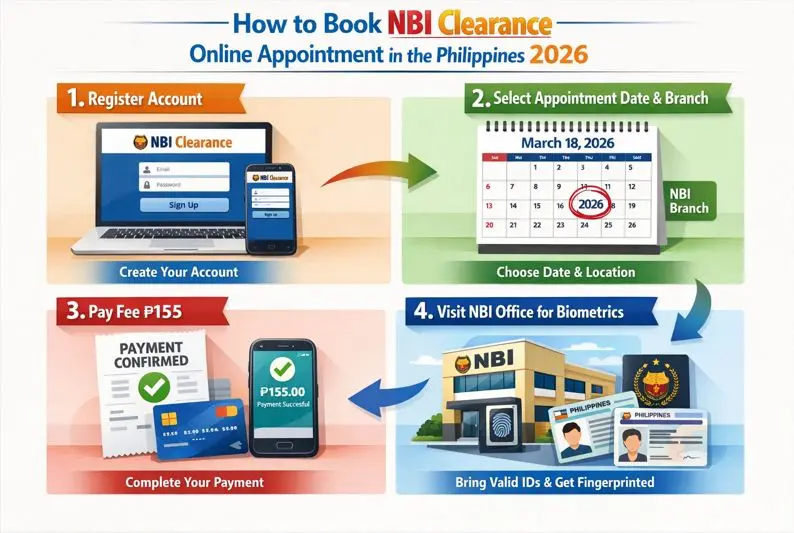
To book an NBI Clearance Online Appointment, follow these steps.
- Visit the official NBI Website to start your Application.
- If you are new, register for an account and provide the required details for registration. If you already have an account, log in to it.
- Once you log in, complete your personal information, enter your personal, contact, and required identity documents. Review the entered email and click save.
- Select your slot for the preferred day, time, and NBI branch to book your appointment.
- Once you have booked the available appointment slot, proceed to pay the fee.
- Pay the NBI clearance fee of P115, P165, or P415, depending on the purpose of clearance, plus a P25 service fee, using your preferred payment method.
- Once you have paid the fee, save the payment receipt and your appointment reference number.
Visit the NBI office 15 minutes before your appointment time on the specified day for biometric and photo capture. Make sure to bring the two valid Government IDs you selected during the NBI online appointment.
Reschedule or Cancel Your NBI Clearance Online Appointment
If you cannot appear at the NBI office on your appointment schedule for any reason, then no worries at all, you can reschedule it by following the process.
- Visit the NBI official website and log in to your account.
- Go to your “Transactions” page.
- Find your booked appointment and click on Reschedule.
- Select another slot for your preferred time and day.
- Click save, and you have now rescheduled your appointment. Make sure to print the updated schedule.
NBI Appointment Fees and Payment Methods
The General fee for an NBI Clearance Online Appointment is ₱130, and an additional small service fee of ₱25. This makes the total payable fee of ₱155. You can pay the fee via any payment option listed here.
- GCash
- Maya (PayMaya)
- 7-Eleven (via CliQQ app)
- Bayad Center
- SM Bills Payment
- Online Banking (through partner banks)
- Visa or Mastercard (for some online options)
Documents Required on the Day of Appointment
On the day of the appointment, you are required to keep the following documents with you when you visit the NBI office.
How to Attend Your NBI Clearance Appointment
After booking your schedule, the next step is attending your NBI clearance appointment. Many first-time applicants worry about what will happen at the NBI branch, but the process is usually simple and organized if you arrive prepared.
Follow these steps during the NBI clearance appointment process:
- Arrive on Time
Reach the NBI branch before your scheduled appointment. Bringing your reference number and valid identification can help avoid delays. - Present Your Appointment Details
Show your appointment confirmation and required IDs at the designated counter. Staff will verify your information before proceeding. - Proceed to Biometrics Collection
After verification, you will be directed to the biometrics area for fingerprint scanning and photo capture. - Wait for Record Verification
NBI personnel will review your details and check for any matching records in their database. - Receive Clearance or Further Instructions
If no issues are found, your clearance may be released on the same day. If a record requires additional checking, you may be advised to return on a later date.
To make your visit smoother, wear appropriate clothing, follow branch instructions, and keep all documents ready before your NBI clearance appointment.
Biometrics and Photo Capture
One of the most important parts of the application is the collection of NBI biometrics. This step helps confirm your identity and ensures that the information in the system matches your application.
During the process:
- Your fingerprints will be scanned electronically.
- A digital photograph will be taken.
- Basic personal information may be reviewed for accuracy.
The procedure usually takes only a few minutes. Follow the staff’s instructions carefully to avoid delays. Make sure your fingers are clean for fingerprint scanning, and look directly at the camera during photo capture.
Verification and Clearance Release
After biometrics are completed, the NBI will conduct a final verification of your records. This review helps determine whether your application can be cleared immediately.
Possible outcomes include:
- No Hit: Your records are clear, and the NBI clearance release may happen on the same day.
- With Hit: A name match or record requires additional verification. You will receive instructions on when to return for the result.
Processing times vary depending on the outcome. Applicants with no issues typically receive their clearance faster, while those with a hit may need to wait for further review.
Issues faced during the NBI Online Appointment Schedule
During the NBI clearance online appointment booking user may face a few issues, which have very simple solutions. The following are the common issues and their solutions.
Wrong Personal Information Entered
You can correct the details when you visit the NBI office. The details can be corrected according to your official government-issued IDs you have provided.
Missed Appointment Schedule
Log in to your account and reschedule your reference in case you have missed the already booked appointment. You can reuse the payment reference to avoid a double fee.
Payment Not Reflecting
Payment may take some time to reflect in the system. Wait for 24 hours after making the payment. If the fee status is still unpaid, contact your payment service provider.
Technical Errors on Website
If you face technical issues on the website, it may be due to high user traffic or an unstable internet connection. Firstly, make sure you have a good internet connection, try accessing the website in off-peak hours, clear your browser cache, or try a different browser.
Important Reminders for Applicants
Before your visit to the NBI offices, you need to make a few reminders so that you don’t face any issues at the department.
- Arrive at the NBI clearance office early, at least 15 to 20 minutes before your scheduled appointment.
- Dress properly according to the government office; avoid wearing sleeveless tops, shorts, or slippers.
- Keep your valid ID, reference number, and proof of payment with you on appointment day.
- NBI offices only entertain people who have confirmed an NBI Clearance online appointment.
- Verify that all your personal details are correct before submitting your application. Errors can cause delays or reprocessing.
Conclusion
The NBI Clearance Online Appointment Philippines system simplifies the application process by allowing applicants to register, schedule appointments, and pay online. By preparing the required documents, attending your appointment on time, and following the correct procedures, you can avoid delays and complete your NBI Clearance application smoothly.