NBI Clearance Registration for the purpose of obtaining your clearance certificate. NBI clearance registration is the process of registering yourself with the official National Bureau of Investigation database, to schedule your appointment to complete biometrics, and to get your first-ever NBI clearance certificate.
Unlike renewal, in which you are already registered with the NBI and can get the renewal online by logging in to your account. Registration for NBI is for first-time clearance seekers or first-time job seekers. During the registration process, you are required to enter your personal details. This registration process adds the biographical and biometric data into the NBI national database, establishing your criminal record status in the Philippines. This guide will help you on how you can register with NBI and can book an appointment after registration.
Who Needs to Register for an NBI Clearance?
The individuals who need the Online NBI Clearance Registration are as follows:
First-Time Job Seekers
If you are an freshgraduate, out of school and entering the workspace of professional life, you need the NBI clearance. It is required as a standard pre-empolyment requirements every Filipino looking for their first job must get the certificate under Republic Act No. 11261 (First Time Jobseekers Assistance Act). If you hold the Bangery certificate confirming the first-time job seeker and residency, you can get the free NBI Clearance.
Students Applying for Scholarships
Students applying for scholarship programs, educational grants, or special school programs are required to get an NBI certificate if they don’t hold one yet.
OFWs and Travel Visa Applicants
If you are applying for travel visas, an immigrant visa, or working abroad, you need the NBI clearance to prove no criminal record. Overseas Filipino workers are required to complete the registration and get the certificate before travelling.
Individuals Applying for Government IDs
Some government-issued IDs and licenses require an NBI Clearance as part of the application process. First-time applicants for documents such as a passport, driver’s license, PRC license, or firearm registration may need to register for an NBI Clearance.
NBI Clearance Registration Requirements
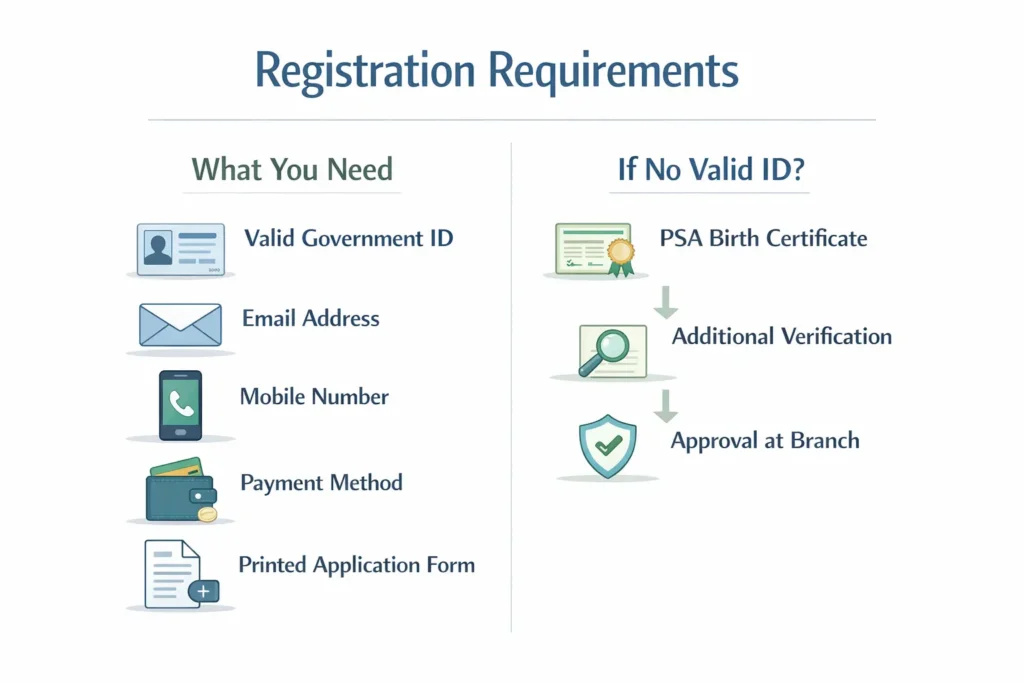
Before starting your online NBI Clearance registration, ensure you have the following requirements ready:
List of Valid Government IDs Accepted
You need at least one (1) valid government-issued ID (two are recommended) for verification. The NBI accepts the following IDs :
- Philippine Passport
- Unified Multi-Purpose ID (UMID) – SSS/GSIS
- Driver’s License (LTO)
- Philippine Identification (PhilID or ePhilID) – National ID
- PRC License (Professional Regulation Commission)
- Voter’s ID or Voter’s Certification from COMELEC
- Postal ID (PHLPost)
- Senior Citizen ID
- PWD ID
- Tax Identification Number (TIN) ID
- School ID (for students, must be accompanied by registration form)
- Barangay Certification with Photo (accepted in some cases)
- NBI Clearance itself (for renewal only, not for first-time registration)
Important: All IDs must be original, valid (not expired), and bear your clear photo and signature.
What if I Don’t Have a Valid ID?
If you do not have the IDs listed above, you may then represent the PSA-Issued Birth Certificate. This will be considered as a secondary document you will undergo further verifications at the NBI Branch. First-time job seekers can also use their Barangay Certification (for a fee waiver) together with any available supporting documents.
Important Notes on Personal Information Accuracy
Double-check all details before submission—errors can cause delays or require a new application.
Enter your name exactly as it appears on your PSA Birth Certificate and valid IDs.
Ensure your middle name, suffix (Jr., III), and birthdate are correctly encoded.
If you have special characters like Ñ/ñ and the system does not accept them, use N/n instead and bring your ID for on-site correction.
Step-by-Step Guide: Online NBI Clearance Registration
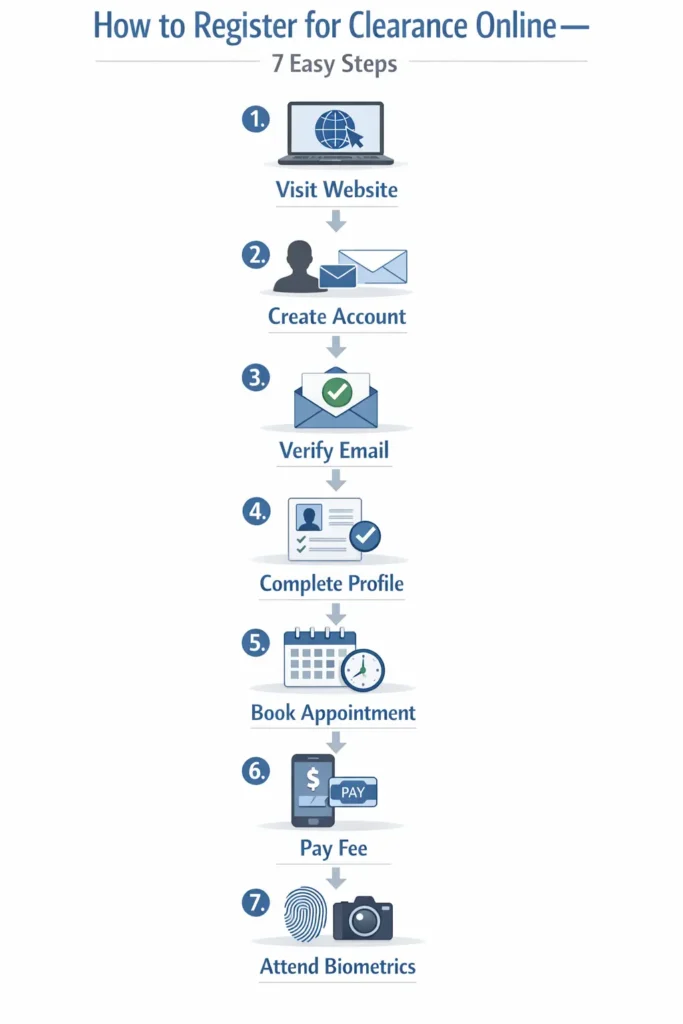
Follow these 7 steps to complete your NBI Clearance registration successfully:
Step 1: Visit the Official NBI Clearance Website
Go to the official NBI Clearance online services portal.
Step 2: Create Your NBI Account (Sign Up)
- Click “Sign Up” or “Register” to create a new account.
- Provide a valid email address and create a secure password.
- Fill in the required fields: full name, birthdate, birthplace, gender, civil status, and mobile number.
- Complete the captcha verification and agree to the terms.
Step 3: Verify Your Email Address
- Check your email inbox for a verification message from NBI.
- Click the activation link sent to you. If you don’t see it, check your Spam or Promotions folder.
- If the link expires, use the “Resend Verification” option on the login page or register again with a different email.
Step 4: Log In and Complete Your Applicant Profile
- Log in using your registered email and password.
- Complete your Applicant Profile with accurate personal information:
- Permanent and current address
- Educational attainment
- Purpose of clearance (choose from dropdown: Local Employment, Travel, Visa, etc.)
- Height and weight (optional but recommended)
- Pro Tip: Match all details exactly with your valid IDs and PSA birth certificate to avoid discrepancies.
Step 5: Set Up Your NBI Online Appointment
- Click on “Apply for Clearance” or “New Application”.
- Select your preferred NBI branch/satellite office from the list.
- Choose an available date and time slot (AM or PM).
- Pro Tip: Book early morning slots to avoid long queues. If slots are unavailable, check nearby branches or try during off-peak hours.
Step 6: Pay the NBI Clearance Fee (Online Payment Options)
After scheduling, proceed to payment. The standard fee is ₱130.00 (base fee) plus a ₱30.00 system/service fee, totaling ₱160.00 .
Accepted payment channels :
- GCash (fast and convenient, select “Mobile” option)
- Maya (formerly PayMaya)
- BancNet online banking (partner banks)
- Landbank LinkBiz Portal
- Over-the-Counter: Bayad Center, 7-Eleven (CLIQQ kiosks), authorized banks
Important: Save your Reference Number after payment. You will need it for your appointment and tracking purposes.
Step 7: Print Your Application Form and Payment Receipt
- After successful payment, print your Application Form (or save a digital copy).
- Print your Official Receipt or save the payment confirmation screenshot.
- These documents are required when you visit the NBI branch.
For First-Time Job Seekers: If you are availing the fee waiver under RA 11261, bring your Barangay Certification and Oath/Undertaking to the branch—do not pay online. The fee will be waived upon document verification.
How to Book Your NBI Appointment During Registration
Selecting Your Preferred NBI Branch/Satellite Office
- The NBI has multiple branches nationwide, including satellite offices in major malls.
- Choose a branch near your residence or workplace for convenience.
- Some branches offer express processing or have shorter queues—check user reviews if possible.
Choosing the Best Date and Time Slot
- Appointments are typically available Monday to Friday, with AM (8:00 AM–12:00 PM) and PM (1:00 PM–5:00 PM) slots.
- Book early as slots fill quickly, especially during peak seasons (summer, graduation months).
- Early morning slots are less crowded and faster.
What to Do If No Slots Are Available?
If you have an urgent need (e.g., overseas employment), bring proof of urgency to the branch and request priority accommodation—though not guaranteed, some branches may assist
Check other branches nearby—don’t limit yourself to just one location.
Refresh the page during off-peak hours (late evening or early morning) as slots may open up due to cancellations.
NBI Clearance Registration Fees
Breakdown of the Total Fee (Base Fee + Service Charge)
| Fee Component | Amount |
| NBI Clearance Base Fee | ₱130.00 |
| System/Service Fee | ₱30.00 |
| Total | ₱160.00 |
For first-time job seekers qualified under RA 11261, the total fee is waived. However, you must present a valid Barangay Certification proving your first-time job seeker status
Payment Channels: GCash, PayMaya, BancNet, and Over-the-Counter
| Payment Method | Details |
| GCash / Maya | Select “Mobile” payment option. You’ll be redirected to log in and authorize payment. Service charge may apply. |
| BancNet / Online Banking | Partner banks include BPI, BDO, Metrobank, etc. |
| Landbank LinkBiz | Direct payment via Landbank portal. |
| Over-the-Counter | Bayad Center, 7-Eleven (CLIQQ), Cebuana Lhuillier, etc. |
| NBI Branch Payment | Some branches accept on-site payment, but online payment is encouraged to avoid delays. |
Pro Tip: Save your payment reference number and screenshot confirmation. If payment does not reflect within 24 hours, contact NBI support with your proof of payment.
What Happens After NBI Clearance Registration?
Documents to Bring on Your Appointment Day
On your scheduled date, bring the following to the NBI branch :
- Printed Application Form (or digital copy)
- Printed Official Receipt / Payment Confirmation
- Valid Government-issued ID (original and photocopy) – bring two IDs if possible
- Barangay Certification (for first-time job seekers availing a fee waiver)
- PSA Birth Certificate (optional but recommended if discrepancies exist)
Dress Code: Wear decent attire—avoid sleeveless shirts, shorts, and slippers.
The Biometrics Process: Photo, Signature, and Fingerprints
At the NBI branch, you will undergo the following steps :
- Document Verification – Present your requirements to the processor.
- Photo Capture – A digital photograph will be taken (ensure proper grooming).
- Signature Capture – You will sign on a digital pad.
- Fingerprint Scanning – Your fingerprints will be captured electronically (both hands).
- Data Verification – Verify that all encoded information (name, birthdate, etc.) is correct on the screen before finalizing.
After biometrics, you will receive instructions on when to claim your clearance. If there is no “HIT”, you may receive it on the same day. If there is a “HIT,” you will be given a return date (usually 5–10 working days) for verification.
NBI Clearance “HIT” Status: What Does It Mean for New Applicants?
Why Does a “Hit” Happen During First-Time Registration?
A “HIT” occurs when the NBI system detects that your full name (or a very similar name) and/or birthdate matches an existing record in the NBI criminal database.
Important: A HIT does NOT automatically mean you have a criminal record. Common causes include:
- Namesake (most common) – Someone with the same or similar name has a record.
- Old records – Even dismissed cases or old complainant records can trigger a HIT.
- Common Filipino names – Names like “John Cruz” or “Maria Santos” frequently get HITs.
The Verification Process for “Hit” Applications
If you receive a HIT :
- You will be instructed to proceed to the Quality Assurance (QA) or “Hit” counter.
- An NBI examiner will conduct an interview and may take additional fingerprints.
- Your fingerprints will be compared with the record in the database.
- If the fingerprints do not match (namesake case), you will be cleared and issued a clearance with “NO CRIMINAL RECORD”.
How Long Does It Take to Clear a “Hit”?
- Namesake HIT (most common): Cleared on the same day in most branches.
- If additional verification is needed, you may be asked to return after 5–10 working days.
- If the record is truly yours (pending case), you will need to provide court documents to resolve the status (see next section).
Pro Tip: Bring supporting documents like your PSA Birth Certificate and multiple valid IDs to speed up the verification process.
Common Problems Faced During NBI Clearance Registration
Website Down or Slow Loading
- Solution: Try accessing during early morning (12 AM–5 AM) or late evening when traffic is low. Clear your browser cache or use a different browser.
Email Verification Not Received
- Solution: Check Spam/Junk folders. If not found, use “Resend Verification” or register again with a different email address (avoid special characters).
Payment Not Reflecting
- Solution: Keep your proof of payment (screenshot/receipt). If payment is not posted after 24 hours, file a Payment Posting Request with NBI through their support channels.
Lost Reference Number
- Solution: Log in to your NBI account—your reference number is visible in the dashboard. Check your email for the confirmation message. If still lost, contact NBI support with your full name and birthdate.
“Duplicate Account” or “Existing Account” Error
- Solution: Try password reset for all email addresses you’ve used. If you previously registered under a maiden name or a different email, prepare a Sworn Declaration of Account Ownership and request consolidation at the branch.
Can’t Find Available Appointment Slots
- Solution: Check other branches nearby. Try during off-peak hours for cancellations. If urgent, visit the branch directly with proof of urgency.
Name/Suffix or Birthdate Mismatch
- Solution: Enter details exactly as on your PSA Birth Certificate. If the system rejects special characters, use the nearest equivalent (e.g., “N” for “Ñ”) and bring supporting documents for on-site correction.
ID Not Accepted at the Branch
- Solution: Bring two valid IDs when possible. If your only ID is not accepted, bring your PSA Birth Certificate as secondary proof.
NBI Clearance Registration vs. Renewal: What’s the Difference?
| Feature | Registration (First-Time) | Renewal |
| Who | First-time applicants with no previous NBI Clearance | Those with existing NBI Clearance (issued 2014 onwards) |
| Process | Create new account, complete profile, book appointment | Log in with existing credentials; “Quick Renewal” option available |
| Biometrics | Required (photo, signature, fingerprints) | May not require full biometrics if data unchanged |
| Fee | ₱160 (or free for qualified first-time job seekers) | ₱160 (no waiver for renewal) |
| Processing | Same day (no HIT) or 5–10 days (with HIT) | Create a new account, complete profile, and book an appointment |